Site structure is the list of a website’s pages, the way they’re grouped into sections, and the links between them. It decides whether a visitor finds an answer in one or two clicks, and whether Google understands which page is the main one for each topic. The minimum for a business site is a home page, service or category pages, an about page and a contact page; case studies, a blog and an FAQ are added depending on the site type.
At the end there’s an audit of our own site, strymba.com: what we found and what we fixed. Figures are as of November 2026.
What is site structure and why does it matter for SEO?
Website structure has three layers:
- pages: what the site contains (services, products, case studies, articles, contacts);
- hierarchy: how pages are grouped into sections and which page is the parent of which;
- links: the menu, footer, breadcrumbs and in-text links that people and search crawlers use to move between pages.
For visitors, good structure means they don’t get lost. From the home page they reach the right section, and from a service page they see a case study, the price and the contact form. For search engines, it means the crawler finds every page and can tell which ones matter most. Google’s own guide says it finds pages mainly through links from pages it has already crawled (Google Search Central). A URL that nothing links to is close to invisible.
There’s a budget reason too. Structure is cheap to plan before design and expensive to change after launch, when pages are already indexed and every changed URL needs a redirect.
What is the basic structure of a website? Pages every site needs
The set of pages depends on the type of site. The table is the minimum we start from when planning.
| Website type | Core pages | Added when needed |
|---|---|---|
| Landing page | one page with sections: offer, benefits, proof, price, FAQ, form | thank-you page, privacy policy |
| Small business website | home, services (one page or several), about, contact | case studies, testimonials, FAQ |
| Corporate website | home, services overview plus one page per service, case studies, about and team, blog, contact | careers, documents, language versions, partner area |
| Online store or catalog | home, categories and subcategories, product pages, cart and checkout (for a store), delivery and payment, contact | brand pages, filter pages, blog, customer account |
One rule applies to every type: one page answers one customer question. If a company builds both corporate websites and online stores, each of those services needs its own page.
Types of website structure
Most guides name four types.
- Hierarchical (tree): home → sections → pages. It fits almost every site with more than five pages and every online store.
- Sequential (linear): pages in a fixed order, such as checkout or a multi-step quote form.
- Matrix (network): pages link to each other with no fixed path, and the visitor picks the route.
- Database (dynamic): pages generated from data by templates, such as product and filter pages in a catalog.
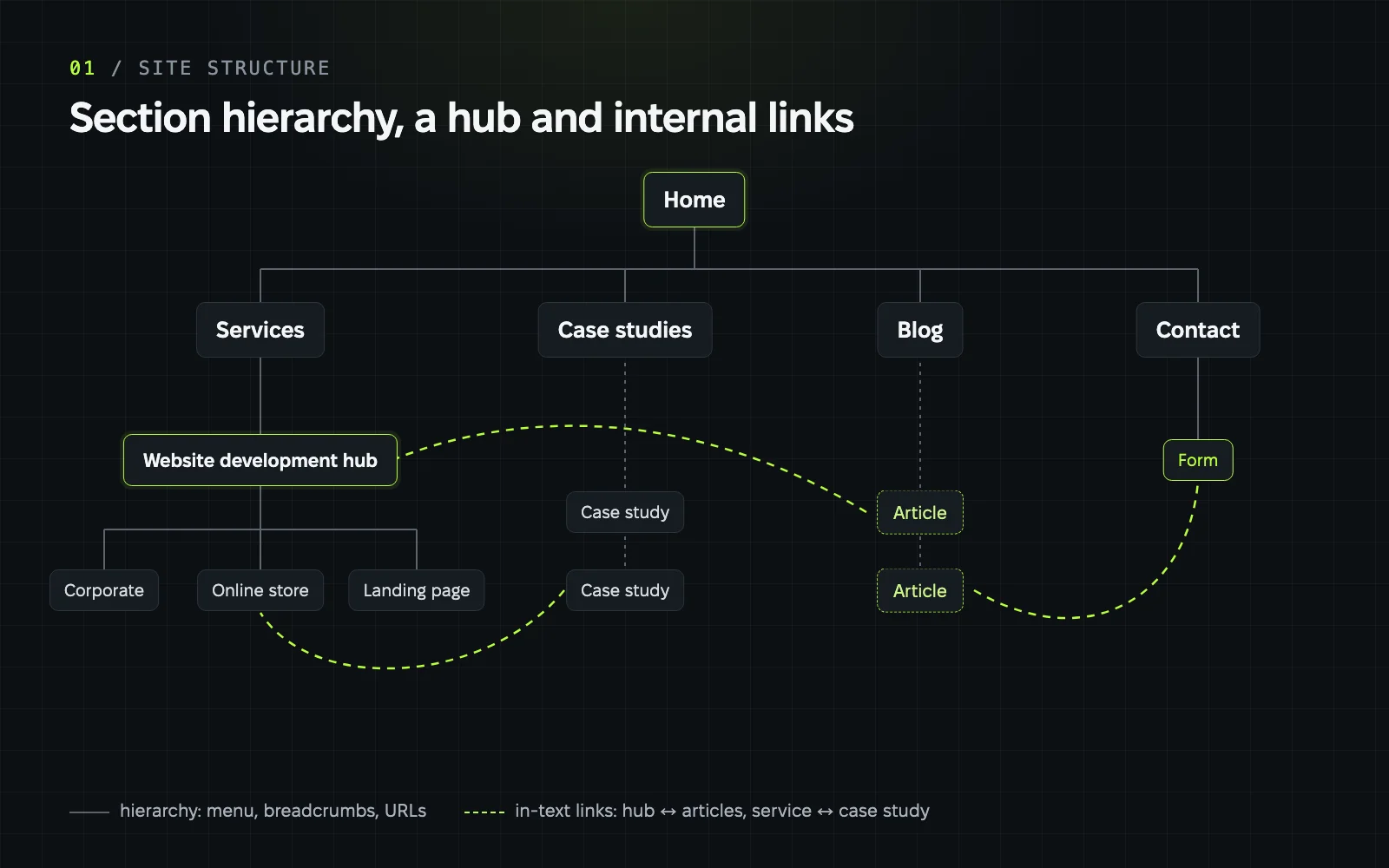
Two practical variants come up as well. A flat structure puts every page one level below the home page: fine for a landing page or a very small site, a pile at 30+ pages. Hub and spoke means a hub page covers a topic broadly and links to child pages, which link back to the hub and to each other. This is how service pages are usually connected to blog articles.
The types mix: an online store has a hierarchy of categories, database-generated product pages and a sequential checkout. On strymba.com, for example, the service hierarchy (the website development hub and one page per website type) is combined with topic hubs: blog articles about websites link to the hub, and the hub links back to the articles.
How to plan your website structure: from search queries to a page map
- List what you sell and to whom: services, product groups, customer segments.
- Collect the search queries for each item: what customers call your service and what they ask before buying. This is your keyword research.
- Group the queries by intent. Queries with the same intent (“corporate website design”, “corporate website development”) go to one page. Queries with different intent (“what is a corporate website” and “hire a corporate website agency”) go to different pages: an article and a service page.
- Assign one main query to each page. We keep this mapping for strymba.com in a table, and before any new page we run a script that checks whether the query already belongs to another page. That protects against keyword cannibalization, where two of your own pages compete for the same query.
- Draw the tree: home, sections, pages, and for each page its parent, URL and main query.
- Add the links: what goes in the menu and footer, and which pages link to each other.
The map can be a spreadsheet, a Figma board or a Miro diagram. What matters is that it’s agreed before the mockups: in our website development projects, it’s where we start. Pick the platform with the finished map in hand too; our guide on how to choose a website platform covers that.
URL structure and breadcrumbs
A URL should show where the page sits in the hierarchy. These are the rules we apply to new pages:
- lowercase, words separated by hyphens, no underscores: Google recommends hyphens because they “clearly signal a word boundary” (URL structure);
- no dates, IDs or tracking parameters;
- no more than two levels:
/websites/corporate-website/(section → page); - one transliteration standard across the whole site if your language isn’t written in Latin script;
- never change a published URL without a 301 redirect from the old address to the new one.
Breadcrumbs are the “Home › Services › Corporate website” line above the heading. They show visitors where they are and let them go one level up. Google uses BreadcrumbList structured data to understand a page’s position in the site hierarchy (documentation). Visible breadcrumbs and the markup should come from the same source and match the real hierarchy.
On large sites, grouping into sections has a technical effect as well. Google recommends grouping topically similar pages in directories, because that helps it learn how often the URLs in each directory change (SEO Starter Guide).
Structure for a multilingual site
If a site has several languages, each language is its own branch of the tree with its own URLs. Ours runs Ukrainian without a prefix and English under /en/. Each pair of pages points to the other through hreflang, and the language switcher leads to the same page in the other language, not to the home page. We write the English version for English-language queries, so its section names can differ from the Ukrainian ones.
How to link pages: menu, footer and internal links
- The menu carries the main sections. We keep four to seven top-level items in ours and put the rest into a dropdown.
- The footer repeats important pages that didn’t fit into the menu. A service page with no link from either the menu or the footer gets less weight.
- In-text internal links connect pages by meaning: service → a case study for that service → an article that answers a pre-purchase question, and back again.
- Blocks such as “Related services”, “Similar case studies” and “Read next” put these links into the template, so every page of that type has them whoever writes the copy.
- Anchor text describes the target page: “how much a website costs”, not “read more”. Google asks for anchor text that is descriptive, reasonably concise and relevant to the target page (Link best practices).
Links should be plain <a href> elements, which crawlers reliably follow. Buttons that navigate only through JavaScript may be missed.
Ecommerce site structure: categories, filters and product pages
In an online store, structure means a category tree plus filters. A category answers a broad query (“men’s suits”); a filter narrows the choice (size, color, brand).
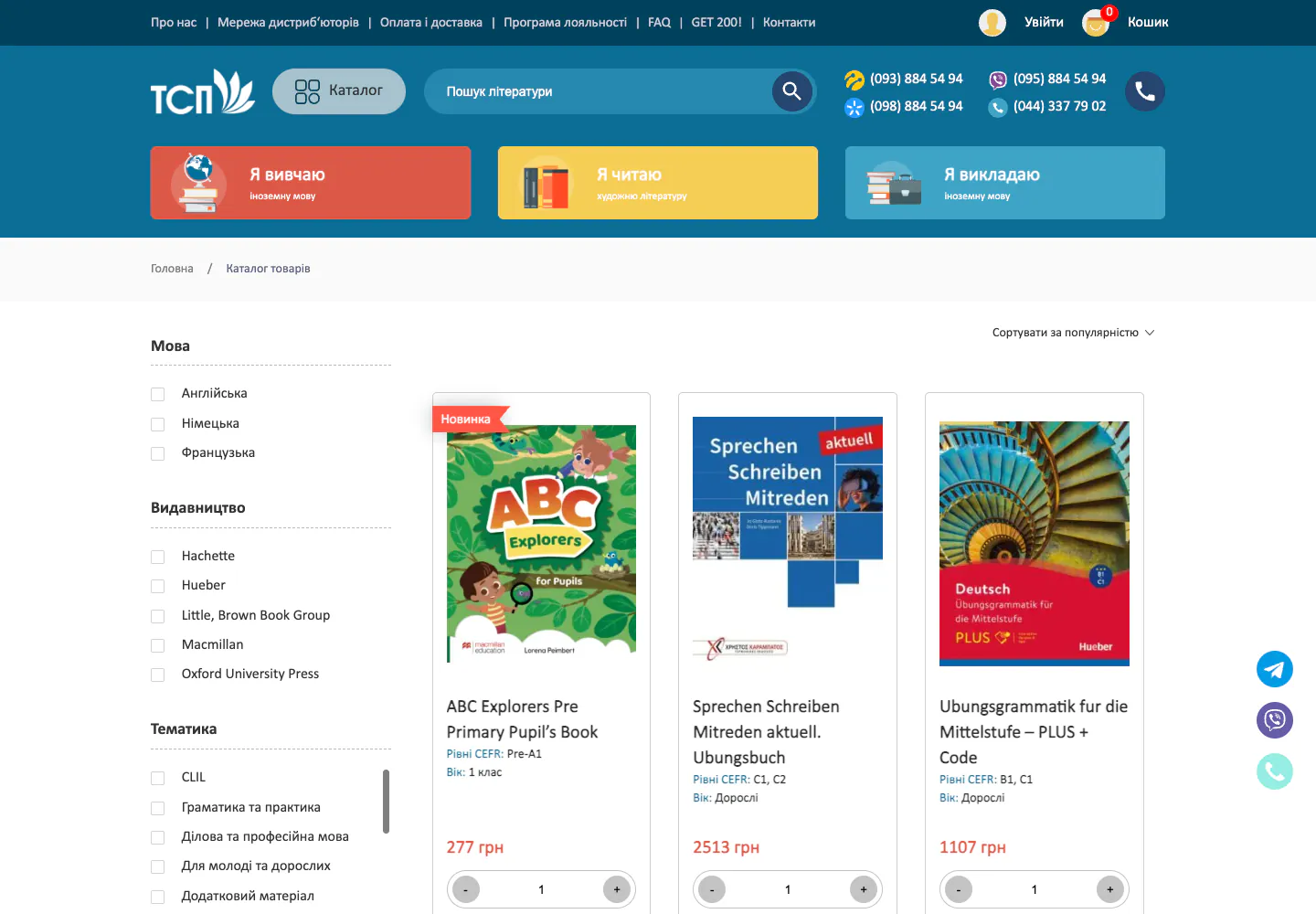
In the TSP bookstore, a catalog of about 10,000 titles can be filtered by language, publisher, subject, CEFR level and age group. For search engines every filter combination is potentially a separate URL, and without rules there are thousands of them.
That’s why filters are split into two kinds. Filters people actually search for (language of the edition, brand, product type) become pages of their own, with a heading, some copy and a place in the sitemap. The rest (sorting, price ranges, combinations of three filters) are kept out of the index. We built the Stager catalog of about 5,000 products with flexible SEO filters. We still run SEO for the store: as of 1 September 2026, 248 of the 1,545 queries we track for it in Google (Kyiv) ranked in the top 10 (SE Ranking data).
A product page lives in one category as its primary home and has one canonical URL, even when the product appears in several sections.
Example: how we audited the structure of strymba.com
On 3 November 2026 we audited the architecture of our own website, crawling every URL in the sitemap and checking Search Console data. The sitemap held 97 URLs: 51 in Ukrainian and 46 in English.
What worked:
- all 97 pages were within two clicks of the home page via the menu, footer and section pages;
- zero orphan pages and zero broken internal links;
- breadcrumbs and BreadcrumbList markup were built from a single source, and Search Console reported zero errors.
What we found:
- 10 of 23 service pages in each language had no link from the menu or the footer;
- case studies didn’t link to each other: zero case-to-case links;
- the website development hub didn’t link to 3 of the 7 blog articles, even though the articles linked to it;
- Ukrainian URLs are nested (
/stvorennya-sajtiv/korporativnij-sajt/), English ones are flat (/en/corporate-website/). We left them as they are on purpose: more than 30 English URLs had only just been indexed, and moving them would have added risk with no benefit.
What we fixed on 11–12 November without changing a single URL:
- a four-column footer listing every service page in both languages;
- a “Related services” block on 38 service pages and “Similar case studies” on 28 case studies;
- a “Further reading” block with articles on the website development hub.
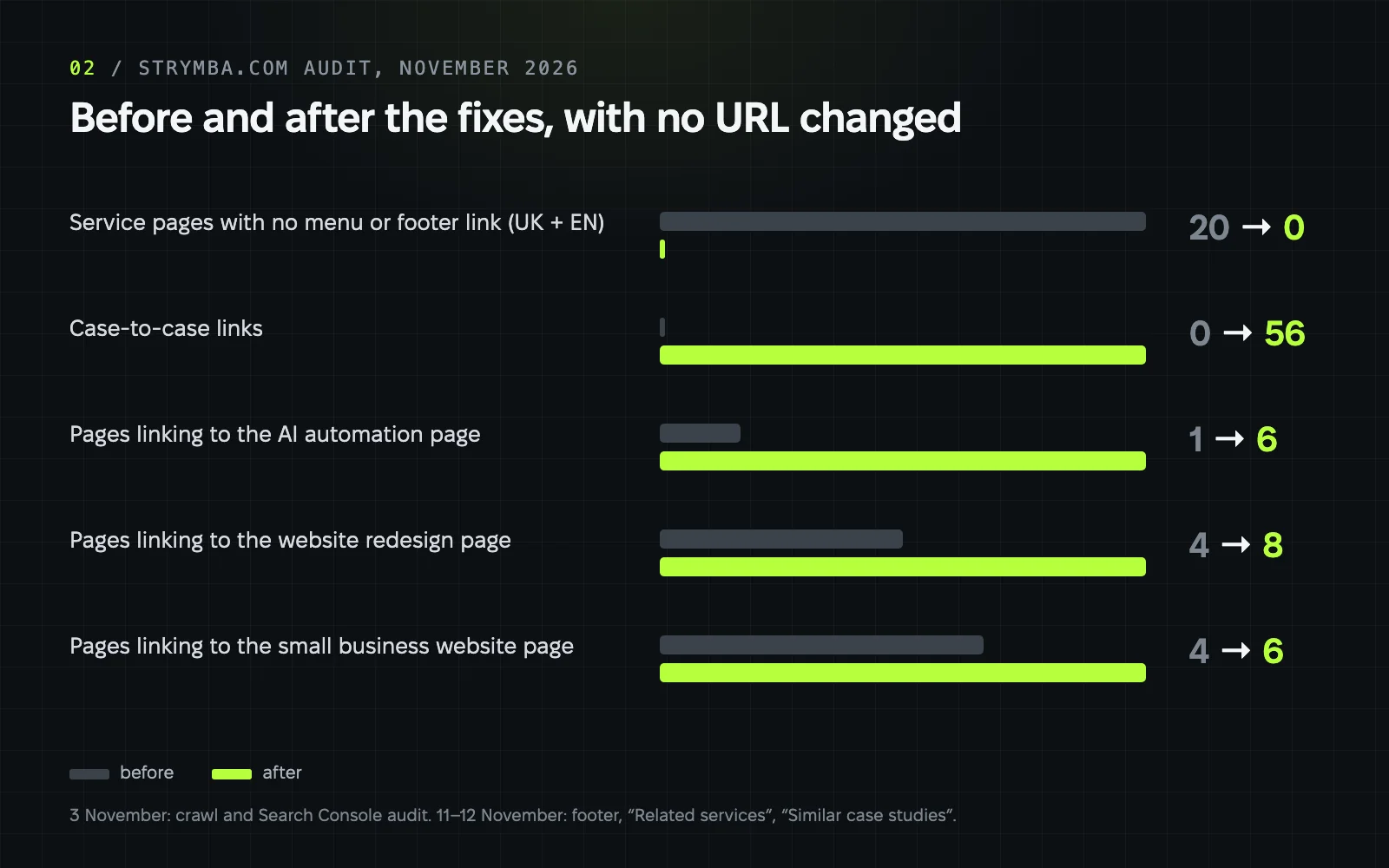
Afterwards, the number of service pages with no menu or footer link went from 20 to 0 (both languages together), and case-to-case links from 0 to 56. The number of pages linking in their body copy to the AI automation page went from 1 to 6, to the website redesign page from 4 to 8, and to the small business website page from 4 to 6.
Common site structure mistakes
- Orphan pages: not in the menu, footer or any copy, so neither people nor search engines find them.
- Pages four or five clicks away from the home page.
- Two pages for one query: a service page and an article with the same H1 competing with each other.
- One page “about everything”: all services on a single page, so none of them ranks.
- Changing URLs during a redesign without 301 redirects: old addresses return 404 and their rankings and backlinks are lost.
- Store filters without indexing rules: thousands of near-identical pages.
- Breadcrumbs that don’t match the real hierarchy or the URL.
Site structure checklist before launch
- Every page has one main query, and no query is assigned to two pages.
- Any page can be reached within three clicks from the home page.
- Every service page is in the menu or the footer.
- Each service page links to a case study, the price and the contact page; each article links to a service.
- URLs are lowercase, hyphenated and no more than two levels deep.
- Breadcrumbs match the hierarchy and carry BreadcrumbList markup.
- 301 redirects are ready for any old URLs.
- Filters are split into indexed and excluded ones.
- sitemap.xml lists only live canonical URLs.
Structure also drives the budget: the more page types and templates, the more design and development. At Strymba a landing page starts from $300, a small business or corporate website from $800, and an online store or catalog from $2,000; our guide to website costs explains what goes into the price. We check the structure of an existing site as part of our free SEO audit.
Site structure FAQ
01What is the basic structure of a website?
A list of pages, their grouping into sections (the hierarchy), their URLs, and the links between them: menu, footer, breadcrumbs and in-text links.
02What are the four types of website structure?
Hierarchical, sequential, matrix and database. Most business sites are hierarchical, with sequential steps in checkout or forms and database-generated product pages.
03How to structure a website for SEO?
Start from search queries: group them by intent, give each group one page, arrange the pages in a tree no more than three clicks deep, and connect them with the menu, footer, breadcrumbs and descriptive in-text links.
04How many levels deep should a site be?
Two URL levels (section → page) are enough for a service business; a store with subcategories may need three. Any page should be reachable within three clicks of the home page.
05Do I need an XML sitemap?
Yes, especially for a new site or a large catalog: it helps Google find pages faster. It doesn’t replace links, though. A page that is only in the sitemap and has no links pointing to it stays weak.
06How do I check the structure of an existing site?
Crawl the site with a tool such as Screaming Frog and look at click depth, pages with no inbound links and broken links. Compare that with the Pages report in Google Search Console to see which URLs aren’t indexed. Or book an SEO audit: structure is part of it.
Next step
Planning a new website or a redesign?
We start with structure: a page map built around your search queries, then design and development.